Throttle Buff is reader-supported: we may earn a commission when you buy through links on this page. Read our affiliate disclosure.
To make motorcycle helmet speakers louder, start with where they sit, not with the volume dial. Center each speaker over your ear, pad it closer if the helmet has deep ear pockets, then check the headset settings that cap or duck the volume. Most quiet speakers are a placement or settings problem, and both are free to fix.
The steps below use Sena’s own wording from the 50S user guide, because it documents every one of these settings with its default. Other headsets have similar settings under other names, so use this as a checklist and look up the matching item in your own manual.
Settings that change how loud a headset gets
| Setting (Sena 50S) | Default | What Sena says it does |
|---|---|---|
| Audio Boost | Enabled | Increases the overall maximum volume |
| Equalizer | Music Balance | Five presets: Music Balance, Music Enhanced, Voice, Bass Boost and Treble Boost |
| Smart Volume Control | Disabled | Changes speaker volume automatically with the level of surrounding noise; set to low, medium or high |
| Audio Overlay Volume Management | Disabled | When enabled, music, radio and GPS are not turned down during an intercom conversation |
| Volume per audio source | Always on | Volume is set and kept separately for each source, such as phone and intercom, even after a restart |
| Earbud port | Not in use | Plugging in earbuds makes them active and the helmet speakers inactive |
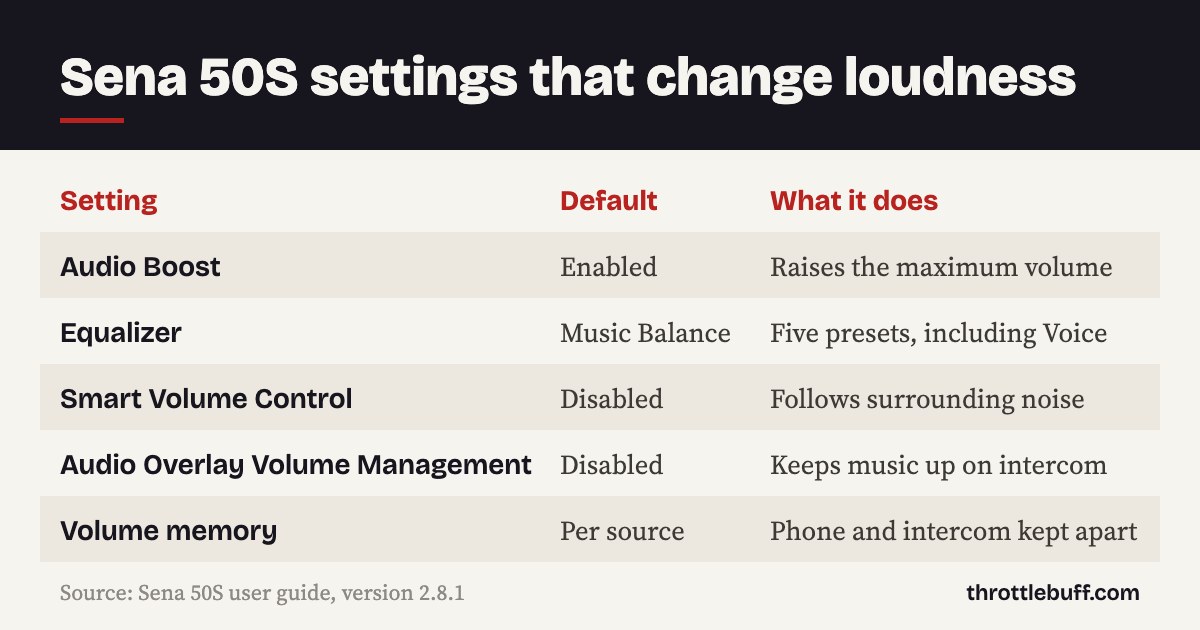
Source: the Sena 50S user guide, version 2.8.1, from Sena’s 50S support page, read in November 2026. Defaults and names can change with firmware, so check the guide for your own model.
How to make motorcycle helmet speakers louder, step by step
1. Center the speakers over your ears
Sena’s install step is short: place the helmet speakers “centered to your ear, in the ear pockets of the helmet”. If a speaker sits forward, back or low of that spot, you hear less of it. Put the helmet on, press a fingertip where your ear canal is, and move the speaker until it sits right there. Our guide on how to install an intercom in your helmet walks through the whole fit.
2. Pad the speakers closer
Distance matters as much as position. Sena’s guide says that if the helmet has deep ear pockets, you can use the speaker pads to place the speakers closer to your ears. They are easy to overlook. Add them until the speaker just brushes your ear without pressing on it. If it hurts after ten minutes, take one layer back out.
3. Turn up the right volume
On the 50S, volume is “set and maintained independently at different levels for each audio source”. So a loud intercom does not mean loud music. Start the source that sounds quiet, then turn the volume up while it is playing. Your phone also has its own Bluetooth media volume, so raise that as well.
4. Check Audio Boost is on
Audio Boost raises the overall maximum volume and is enabled by default on the 50S. If someone has switched it off, the headset will top out lower than it can. This is the first thing to check if your search was “Sena volume too low”.
5. Pick an equalizer preset that suits the problem
If voices are the hard part, Sena’s Voice preset raises the midrange of the human voice and cuts environmental noise. Bass Boost raises audio at 130 Hz and below, and Treble Boost raises 6 kHz and above. One catch from the guide: with Audio Boost enabled, the equalizer has no effect at maximum volume and only works below it.
6. Let the headset follow the noise
Smart Volume Control is off by default on the 50S. Enabled, it changes the speaker volume automatically based on the level of surrounding noise, so it should rise as the ride gets louder. Cardo has the same idea: its Packtalk Edge support page says Automatic Volume Control is switched on in the app settings and is off by default.
7. Stop the music ducking under the intercom
If your music drops whenever someone talks, that is by design. With audio multitasking, Sena plays overlaid music, radio or GPS at reduced volume during an intercom conversation. Enabling Audio Overlay Volume Management stops that reduction. For how intercom modes differ, see mesh vs Bluetooth intercom.
8. Change what you listen through
If placement and settings are right and it is still not enough, the hardware is the limit. Two routes are left. The 50S clamp has an earbud port, and Sena says the earbuds become active while the helmet speakers go inactive. Earbud laws differ by state, so check yours first, then see our best motorcycle earbuds. The other route is bigger or better speakers: our best motorcycle helmet speakers guide covers the options.
The headset in this guide
Sena 50S

The settings above come from the user guide for the 50S, Sena’s mesh headset with Harman Kardon speakers. Sena lists the speaker driver as 40 mm across and 7.2 mm thick. Read our Sena 50S review, or compare it with the rest of the range in the Sena comparison chart.
Louder is not always the answer
Speakers have to beat wind noise, and wind noise is the real problem at highway speed. The US workplace guidance gives a sense of scale. NIOSH sets its recommended exposure limit at 85 A-weighted decibels averaged over an eight-hour day, and for each 3 dBA above that it recommends halving the exposure time. It also tells workers to keep the volume low on personal devices.
So the better fix is often less noise, not more volume. A quieter helmet lets you hear the same speakers at a lower setting: see our quietest motorcycle helmets. If you have ringing ears or any worry about your hearing, that is a question for a doctor or audiologist.

FAQ
Why are my helmet speakers so quiet?
Usually because they are not centered over your ear canals or sit too far from your ears. After that, check the volume for that audio source and the headset’s boost setting.
Why is my Sena volume too low?
On a 50S, check that Audio Boost is enabled, turn the volume up while the quiet source is playing, and raise your phone’s media volume. Music also plays quieter during intercom unless Audio Overlay Volume Management is enabled.
Do speaker pads make helmet speakers louder?
They move the speakers closer to your ears, which is what Sena supplies them for in helmets with deep ear pockets. Closer speakers sound louder and fuller at the same setting.
Does the equalizer make speakers louder?
It changes which frequencies are raised, not the maximum volume. On the 50S it has no effect at maximum volume while Audio Boost is on.
Should I buy new speakers or a new headset?
Try placement, pads and settings first. If the speakers are still not enough, an upgrade speaker kit usually costs less than a new headset. If you also want mesh or longer range, compare headsets in our best motorcycle intercoms guide.
Verdict
Work in this order: center the speakers, pad them closer, turn up the right source, then check the boost, equalizer and automatic volume settings. Only after that think about earbuds or upgrade speakers. And if you can only hear your music at full volume on the highway, fix the noise as well as the speakers.
Browse all our intercom guides.